DSPIC30F6012A-20E/PT Microchip Technology, DSPIC30F6012A-20E/PT Datasheet
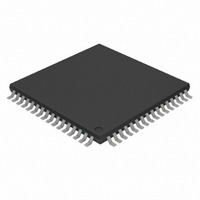
DSPIC30F6012A-20E/PT
Specifications of DSPIC30F6012A-20E/PT
Available stocks


Related parts for DSPIC30F6012A-20E/PT


DSPIC30F6012A-20E/PT Summary of contents
Page 1
... Microchip corporate web site (www.microchip.com). TABLE 1: SILICON DEVREV VALUES Part Number dsPIC30F6011A dsPIC30F6012A dsPIC30F6013A dsPIC30F6014A Note 1: The Device and Revision IDs (DEVID and DEVREV) are located at the last two implemented addresses in program memory. 2: Refer to the “ ...
Page 2
... I/O pin is initially set high and the module is configured to drive the pin low at a specified time. For this revision of silicon, pin OSC2/RC15 is operational for digital I/O and CLKOUT only in specific oscillator modes. Affected (1) Revisions devices, the ® DSC device © 2010 Microchip Technology Inc. ...
Page 3
... Sleep Mode Note 1: Only those issues indicated in the last column apply to the current silicon revision. © 2010 Microchip Technology Inc. dsPIC30F6011A/6012A/6013A/6014A Issue Summary For this revision of silicon, the LP Oscillator is not operational. ADC event triggers from the INT0 pin will not wake-up the device from Sleep mode if the SMPI bits are non-zero ...
Page 4
... Load a value greater than ‘0’ to the OCxRS register when operating in PWM mode. In this case duty cycle is achievable the application requires 0% duty cycles, the output compare module can be disabled for 0% duty cycles, and re-enabled for non-zero percent duty cycles. Affected Silicon Revisions © 2010 Microchip Technology Inc ...
Page 5
... NOP instructions .rept 31 NOP .endr ; Place SLEEP instruction in the last word of program memory PWRSAV #0 © 2010 Microchip Technology Inc. dsPIC30F6011A/6012A/6013A/6014A This can be accomplished by replacing all occurrences of the PWRSAV #0 instruction with a function call to a suitably aligned subroutine. The address( ) attribute provided by the MPLAB ASM30 assembler can be utilized to correctly align the instructions in the subroutine ...
Page 6
... Note: The above work around is recommended for users for whom application hardware changes are possible, and also for users whose includes a 32 kHz LP Oscillator crystal. Affected Silicon Revisions Section 29. “Oscillator” application hardware already B1 © 2010 Microchip Technology Inc. ...
Page 7
... This will also clear the RBF flag Clear the I C receiver interrupt flag SI2CF back to step 1 to continue receiving incoming data bytes. © 2010 Microchip Technology Inc. dsPIC30F6011A/6012A/6013A/6014A Work around 2: Use this work around for applications in which the receiver interrupt is required. Assuming that ...
Page 8
... C language, MPLAB C30 version 3.11 or higher, provides the following command-line switch that implements a work around for the erratum. -merrata=psv_trap Refer to the readme.txt file in the MPLAB C30 v3.11 tool suite for further details. Affected Silicon Revisions © 2010 Microchip Technology Inc. ...
Page 9
... Work around None. Affected Silicon Revisions © 2010 Microchip Technology Inc. dsPIC30F6011A/6012A/6013A/6014A 12. Module: I When the I I2CEN bit in the I2CCON register, the dsPIC DSC device generates a glitch on the SDA and SCL pins. This glitch falsely indicates “Communication Start” to all devices on the I with the a bus collision in a multi-master configuration ...
Page 10
... CY Work around None. However, the user may use a timer interrupt and write to the associated PORT register to control the pin manually. Affected Silicon Revisions © 2010 Microchip Technology Inc. ...
Page 11
... OSC2 pin function is determined by FPR<4:0>. 2: OSC1 pin cannot be used as an I/O pin even if the secondary oscillator or an internal clock source is selected at all times. © 2010 Microchip Technology Inc. dsPIC30F6011A/6012A/6013A/6014A Work around None. In future revisions of silicon, port pin RC15 may also be configured for Digital I/O and CLKOUT for additional oscillator modes ...
Page 12
... In order to remain within the I PD listed in the device data sheet, the user software must completely disable the ADC module by setting the ADC Module Disable bit in the corresponding Peripheral Module Disable (PMDx) register, prior to executing a PWRSAV instruction. Affected Silicon Revisions © 2010 Microchip Technology Inc. specifications #0 ...
Page 13
... Param Symbol Characteristic No. V Input Low Voltage IL DI19 SDA, SCL V Input High Voltage IH DI29 SDA, SCL © 2010 Microchip Technology Inc. dsPIC30F6011A/6012A/6013A/6014A specifica- IL Standard Operating Conditions: 3.3V and 5.0V (±10%) (unless otherwise stated) Operating temperature Min Typ Max V — 0.8 SS 2.1 — ...
Page 14
... Rev. A2 Silicon Errata” • DS80303, “dsPIC30F6011A/6012A/6013A/6014A Rev. B0 Silicon Errata” • DS80401, “dsPIC30F6011A/6012A/6013A/6014A Rev. B1 Silicon Errata” Rev B Document (6/2010) Added silicon issue 21 (ADC) and data sheet clarification 1 (DC Characteristics: I/O Pin Input Specifications). DS80457B-page 14 © 2010 Microchip Technology Inc. ...
Page 15
... PICtail, REAL ICE, rfLAB, Select Mode, Total Endurance, TSHARC, UniWinDriver, WiperLock and ZENA are trademarks of Microchip Technology Incorporated in the U.S.A. and other countries. SQTP is a service mark of Microchip Technology Incorporated in the U.S.A. All other trademarks mentioned herein are property of their respective companies. ...
Page 16
... Philippines - Manila Tel: 63-2-634-9065 Fax: 63-2-634-9069 Singapore Tel: 65-6334-8870 Fax: 65-6334-8850 Taiwan - Hsin Chu Tel: 886-3-6578-300 Fax: 886-3-6578-370 Taiwan - Kaohsiung Tel: 886-7-536-4818 Fax: 886-7-536-4803 Taiwan - Taipei Tel: 886-2-2500-6610 Fax: 886-2-2508-0102 Thailand - Bangkok Tel: 66-2-694-1351 Fax: 66-2-694-1350 © 2010 Microchip Technology Inc. 01/05/10 ...